If your printer keeps saying low toner when you just replaced it, you are not imagining things and you are not alone. This is one of the most common and frustrating printer complaints in offices across Broken Arrow and the greater Tulsa area, and the good news is that it almost never means your brand new cartridge is actually empty. In most cases the message is a software or sensor quirk, not a real shortage of toner. Understanding what is really happening behind that warning light will save you time, money, and a few gray hairs.
Below we will walk through why this happens, how to clear the message, and when a persistent low toner warning is actually pointing to a deeper hardware problem worth a technician’s attention.
The Real Reason Your Printer Keeps Saying Low Toner When You Just Replaced It
Here is the part that surprises most people: your printer does not actually measure how much toner is inside the cartridge. Laser printers estimate toner levels using a combination of page counts, dot coverage, and developer roller rotations. In other words, the printer is doing math, not looking at powder. Brother, for example, explains that its machines estimate remaining toner by counting printed dots and roller rotations rather than physically sensing the powder, which is exactly why a “low” or “replace” alert can appear prematurely. You can read Brother’s own explanation of that detection method for a clear picture.
Most modern cartridges also carry a small smart chip that tracks usage. When you install a fresh cartridge, the printer is supposed to read a new chip and reset the counter. If the counter does not reset, or if the chip is not recognized, the printer will keep displaying the old low toner reading no matter how full the cartridge really is. The technology behind that chip is what keeps the estimate ticking down, and it is often the culprit behind a stubborn warning.
Common Causes and How to Fix Them
When a replacement cartridge still triggers a low toner alert, the cause usually falls into one of a handful of buckets. The most frequent is a protective seal or strip of shipping tape left on the new cartridge, which blocks toner from reaching the drum and can confuse the chip. Remove the cartridge and pull off every seal and pull tab, then reinstall it. The second common cause is an old chip that was never reset, where the printer keeps reading the previous counter, so you either reset the toner counter or run your model’s cartridge reset routine. A third cause is a low quality or refilled cartridge whose chip reports low or is not recognized at all, which you fix by reseating it or swapping in a cartridge your printer recognizes. Toner that has settled unevenly during shipping can also read low, and gently rocking the cartridge side to side redistributes the powder. Finally, a failing optical sensor or a worn drum unit can misreport levels, and that one calls for inspection or service.
The table below lines up each of those causes with what is happening and what to do about it.
| Cause | Why It Happens | What To Do |
|---|---|---|
| Protective seal or tape left on | Shipping tape or a pull tab is still blocking toner or the chip | Remove the cartridge, pull off all seals and tape, then reinstall |
| Old chip not reset | The printer reads the smart chip, not the toner, and the counter never reset | Reset the toner counter or run the cartridge reset for your model |
| Low quality or refilled cartridge | An aftermarket chip reports low or is not recognized | Reseat it, or replace with a cartridge your printer recognizes |
| Toner settled or uneven | Powder shifted during shipping or storage | Remove the cartridge and gently rock it side to side to redistribute toner |
| Failing sensor or drum | The optical sensor or drum unit is worn | Have the sensor and drum inspected or serviced |
How To Clear the Message and Keep Printing
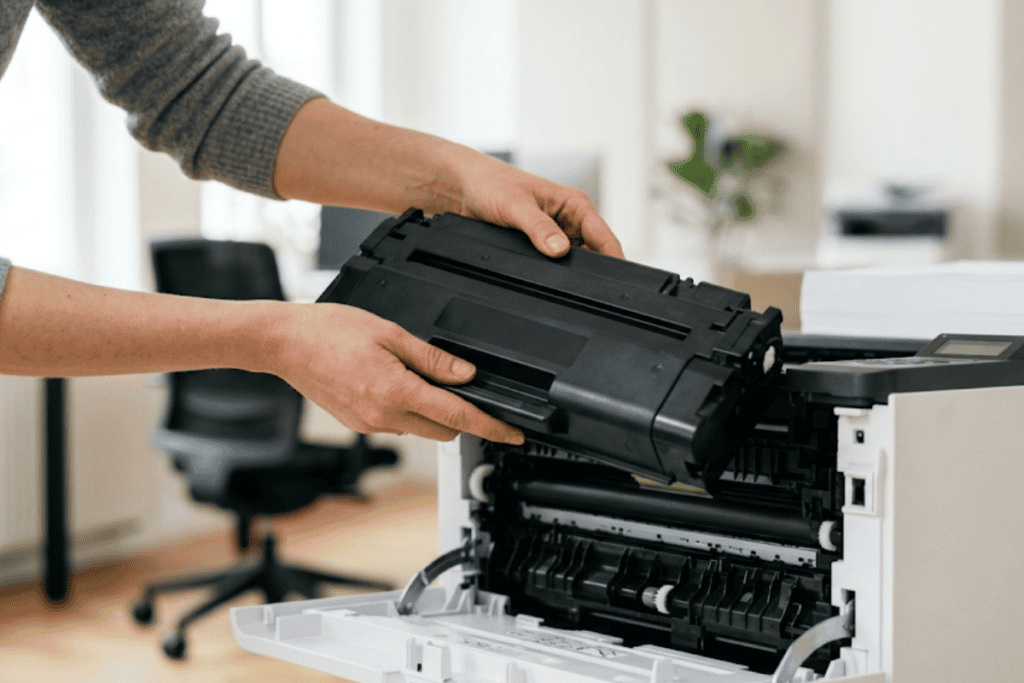
Once you know the cause, clearing a false low toner alert is usually quick. Start with the simplest steps before assuming the cartridge is bad. If you are comfortable with a manual reset, community repair guides such as this iFixit walkthrough show how to override a stubborn replace toner error using continue mode and a gear reset. If you would rather follow a clean, illustrated cartridge swap first, this university IT knowledge base has a helpful step by step for replacing a toner cartridge correctly, since a cartridge that is seated even slightly wrong can trigger the same warning.
- Power the printer off, wait about 30 seconds, and power it back on to force a fresh chip read.
- Open the front cover, remove the cartridge, and confirm every piece of tape and every seal is gone.
- Gently rock the cartridge side to side a few times to even out the toner powder.
- Reseat the cartridge firmly until it clicks into place, then close the cover.
- Run your model’s toner reset from the control panel or driver utility if the message persists.
It also helps to understand the process the toner is part of. Laser printing relies on electrophotography, where a charged drum attracts fine toner powder and fuses it to the page with heat. When any part of that chain is disrupted, from the chip to the drum, the printer can report a level that does not match reality.
When Low Toner Really Means Something Else
Sometimes a repeat low toner message is your printer’s way of flagging a genuine hardware issue. If you have reset the counter, confirmed the cartridge is genuine and correctly installed, and the alert still returns within a few pages, the problem may be a failing toner sensor, a worn drum, or a dirty contact point that is misreading the chip. At that stage, continuing to swap cartridges only wastes money. A quick diagnostic from a certified technician can confirm whether the sensor or drum needs attention, and professional repair is far cheaper than replacing a whole machine. Businesses that run several printers often find that these small nuisance errors add up, which is why many offices move to a monitored printing program that handles toner and maintenance automatically.
Why Choose Sundance Office
Sundance Office has served Broken Arrow, Tulsa, Oklahoma City, and the surrounding communities for years, and printer headaches like a false low toner alert are exactly the kind of thing our team solves every day. We supply genuine, recognized toner cartridges that install cleanly and reset the way they should, so you are not chasing phantom warnings. Our certified technicians can inspect sensors, drums, and contacts when a message will not clear, and our managed print options take toner tracking off your plate entirely. If you are stocking a busy office, our guide to the supplies every business should keep on hand is a useful companion read. When you work with a local partner, you get faster answers and next day delivery instead of a long hold with an overseas call center.
Conclusion
A printer that keeps saying low toner when you just replaced it is usually reporting an estimate, not an emergency. Nine times out of ten the fix is removing a seal, resetting the chip counter, reseating the cartridge, or redistributing settled toner. When the message truly will not clear, it is a signal to have the sensor or drum checked rather than to keep buying cartridges. Handle the simple steps first, and lean on a trusted local supplier when the problem runs deeper. Call Sundance Office to keep your Broken Arrow or Tulsa office printing without the guesswork.
Ready to stop fighting your printer? Contact Sundance Office today for genuine toner and expert print support.
Frequently Asked Questions
Why does my printer say low toner when I just changed it?
Laser printers estimate toner using page counts and roller rotations rather than measuring the powder directly. If the cartridge chip did not reset or a seal was left on, the printer keeps showing the old low reading even though the cartridge is full.
Why is my printer still indicating low toner after replacing the cartridge?
The most common reasons are an unreset chip counter, a piece of shipping tape still on the cartridge, or an aftermarket chip the printer does not recognize. Reseating the cartridge and running the toner reset usually clears it.
How do I reset the toner counter after replacing the cartridge?
Each brand has its own sequence, often found in the control panel menu or triggered by opening and closing the front cover in a specific pattern. Check your model’s manual for the exact toner reset steps, since they vary by manufacturer.
Can I still print when my printer says low toner?
Yes. A low toner warning is an early alert, and most printers will keep printing for many more pages. You may notice lighter output only when the toner is genuinely running out.
How do I override the low toner message and keep printing?
Many printers have a continue or ignore setting in the menu that lets you keep printing past a low toner alert. Some models require holding a specific button combination to bypass the warning until you are ready to replace the cartridge.