
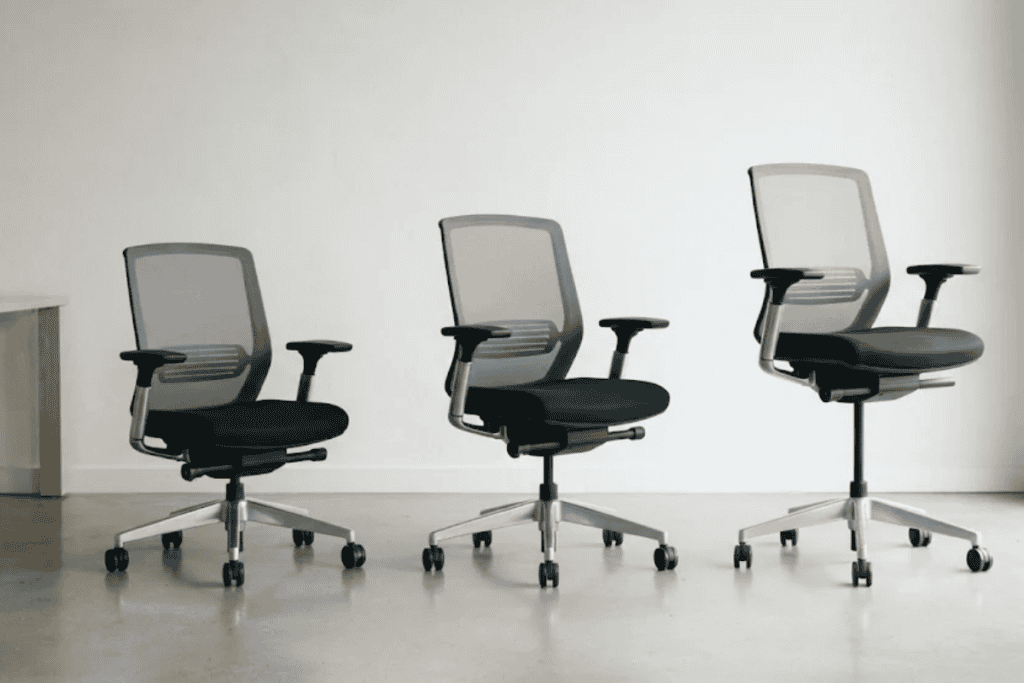
The most common office chair mistake is buying a four-legged model, because OSHA’s workstation guidance warns that chairs with four or fewer legs are prone to tipping and calls for a strong, five-legged base instead. Shoppers comparing office chairs Tulsa, OK businesses rely on often start with color and price, but the features that decide whether a chair works for a full shift are the ones that adjust: seat height, lumbar support, recline, and armrests. This guide explains what to check, how to set a chair up at the desk, when to replace it, and how to buy for a whole team without ending up with a mismatch of comfort levels.
What to Check Before You Buy Office Chairs in Tulsa, OK
A chair is the one piece of equipment every employee touches for most of the day, which is why a poor choice shows up as complaints faster than almost any other purchase. OSHA’s guidance on the workstation chair gives a clear list of what to look for, and most of it is about adjustment rather than appearance.
Start with the base. OSHA calls for a strong, five-legged base and notes that chairs with four or fewer legs are prone to tipping. Casters should suit the workstation’s flooring, so a chair headed for hard flooring should not be chosen on the assumption that carpet casters will do.
Next, look at seat height. The seat should let the entire sole of the foot rest on the floor, with the back of the knee slightly higher than the seat. If the seat cannot be lowered enough for a shorter employee, a footrest is the fix. The seat pan itself should be padded, with a rounded “waterfall” edge, and its depth should be adjustable.
The backrest matters just as much. OSHA says it should allow the user to recline at least 15 degrees from the vertical, and it should lock in place or be tension adjustable. Lumbar support should be height adjustable so it lands in the right spot for each person. Armrests are optional, but when a chair has them they should be adjustable, soft, and rounded at the edges so the shoulders can relax and the upper arms stay near the body.
How to Set Up the Chair at the Desk

Even the right chair performs badly when it is set up wrong. OSHA’s description of working postures is a useful reference for anyone adjusting a chair for the first time. Elbows should be bent between 90 and 120 degrees and kept close to the body. Thighs and hips should be supported and generally parallel to the floor, with knees about the same height as the hips and the feet slightly forward. The feet should be fully supported by the floor or by a footrest, and the back should be fully supported with appropriate lumbar support.
Some people prefer to lean back while they work. In reclined sitting, OSHA describes the torso and neck reclining 105 to 120 degrees from the thighs. A chair that cannot reach that range will push those users back into an upright position they find tiring.
The desk has to cooperate as well. OSHA’s guidance on leg clearance says the space under the desk should work for the upright seated posture and at least one other seated posture, so the chair can slide in and the legs are not wedged against a drawer or panel. Placement matters too. OSHA advises against putting desks or chairs directly under vents unless the vents redirect the airflow away from the person sitting there.
The table below collects the main chair benchmarks in one place.
| Chair feature | What to look for |
|---|---|
| Base | Strong, five-legged base; four or fewer legs are prone to tipping |
| Backrest recline | At least 15 degrees from the vertical, locking or tension adjustable |
| Seat height | Entire sole of the foot on the floor, back of the knee slightly higher than the seat |
| Elbow position | Bent between 90 and 120 degrees, close to the body |
| Reclined sitting | Torso and neck recline 105 to 120 degrees from the thighs |
| Cushion and lumbar padding | Support often fades within 2 to 4 years |
| Gas cylinder, tilt mechanism, casters | Typically fail around 5 to 8 years |
Know When an Office Chair Has Reached the End
Chairs wear out in stages, and the first stage is the hardest to see. According to Sundance Office’s own guide to replacing office chairs, most quality chairs last 5 to 10 years under standard daily use. Commercial-grade chairs tested to industry standards last about 7 to 8 years at roughly 8 hours a day, 5 days a week, while budget chairs without comparable testing often lose comfort and support within 1 to 3 years.
Within a single chair, the cushion and lumbar padding usually fade first, often within 2 to 4 years. The mechanical parts, meaning the gas cylinder, tilt mechanism, and casters, typically fail around 5 to 8 years. The frame and outer fabric or mesh can look acceptable for 7 to 10 years or more, which is why a worn-out chair can still look fine from across the room. Mesh tends to show stretching and sagging sooner than tightly woven fabric.
Watch for these signs that a chair needs attention:
- The seat sinks during the day or will not hold its height
- Casters stick, wobble, or do not roll smoothly
- Fabric is torn or padding has flattened
- Employees report new back, neck, or shoulder discomfort
- The chair is older than 7 to 8 years and shows two or more of these problems
Repair usually makes sense for a high-end chair with a single worn part. Replacement is usually more cost-effective when a chair has multiple issues or has passed the 7 to 8 year mark.
Buying Office Chairs for a Whole Team
Outfitting a team adds a second question: how many different bodies and tasks does one purchase need to cover? A chair that suits a person at a reception desk all day may not suit someone who moves between a desk and a conference table, so it helps to sort employees by how many hours they sit and what they do while seated. OSHA’s purchasing checklist lists a seat height that adjusts from 15 to 22 inches and a sturdy five-legged base, which gives a simple baseline for comparing models across a price range.
When several chairs reach the 7 to 8 year window together, batch replacement is usually easier on the budget than replacing them one complaint at a time, and it keeps the room looking consistent. Ask for warranty terms in writing, because warranty length is a rough guide to how much confidence a manufacturer has in the mechanism. For a wider look at what else goes into a workspace, the full line of office furniture is worth browsing alongside chairs.
Why Choose Sundance Office
Chair buying goes wrong when every seat in the building is the same model, and Sundance Office approaches it the other way around. The chair selection spans different price points and warranty lengths, drawn from brands such as HON, DMI, Alera, and Lorell, so a front-desk seat, a manager’s chair, and a conference room set do not all have to come from the same tier. That range matters in a market like Tulsa, where a single office may mix long-tenured staff who want a premium mechanism with new hires who just need a solid, adjustable seat.
Because there is no minimum order, one replacement chair for the employee with a failing gas cylinder is as welcome as a full floor of seating. Free next-day delivery covers businesses near Tulsa, including Broken Arrow, Jenks, and Bixby. The furniture team also handles space planning and installation, so the chairs arrive with a plan for where they go. A free consultation is available for orders of any size.
Conclusion
The right office chair has a five-legged base, a seat that lets the whole foot rest on the floor, a backrest that reclines at least 15 degrees, and adjustments that let each person set the chair to their own body. Set it up with elbows at 90 to 120 degrees, keep it away from direct airflow, and replace it when the mechanism or padding starts to fail. If you are ready to compare options for your team, call 918.252.4100 or request a free consultation and the team will help match chairs to people and budget.
Need office chairs for your Tulsa team? Contact Sundance Office for a free consultation.
Frequently Asked Questions
How long do office chairs usually last?
Most quality office chairs last 5 to 10 years under standard daily use. Commercial-grade chairs tested to industry standards last about 7 to 8 years at roughly 8 hours a day, 5 days a week. Budget chairs without comparable testing often lose comfort within 1 to 3 years.
What features should an ergonomic office chair have?
OSHA lists a strong five-legged base, a seat height that lets the whole foot rest on the floor, and a backrest that reclines at least 15 degrees from the vertical. Lumbar support should be height adjustable, and any armrests should be adjustable and soft with rounded edges.
How should you sit in an office chair?
Keep your elbows bent between 90 and 120 degrees and close to your body. Your thighs should be supported and generally parallel to the floor, with your feet fully supported by the floor or a footrest. Your back should rest against the lumbar support.
Is a mesh or fabric office chair better?
Both types typically last 5 to 10 years. Mesh tends to show visible wear such as stretching and sagging sooner than tightly woven fabric, so the better choice depends on how the chair will be used and what feels comfortable to the person sitting in it.
When should an office chair be replaced?
Replace a chair when the seat sinks, the casters stick, the padding flattens, or users report new back or neck discomfort. A chair older than 7 to 8 years that shows two or more of these problems is usually more cost-effective to replace than repair.